Charity website content management without a developer
Stop waiting on developers. Learn which CMS fits your charity and how to configure it so communications teams can publish campaigns, pages, and donations fast. charity website content management, CMS for charities, Webflow vs WordPress, configure charity CMS, nonprofit website publishing, charity CMS setup, donation page updates

Summary
The choice of CMS matters, but it matters less than how the CMS is configured. A well-set-up open-source platform will serve a charity better than a poorly configured enterprise system. The practical path forward is this: choose a platform that fits your budget and integration needs, configure user roles that reflect your actual team structure, build templates for the content you publish most often, and connect your fundraising tools properly from the outset. Thinking about governance as a core part of the build is essential, see Socialectric's guide to nonprofit website design governance frameworks for a deeper dive.
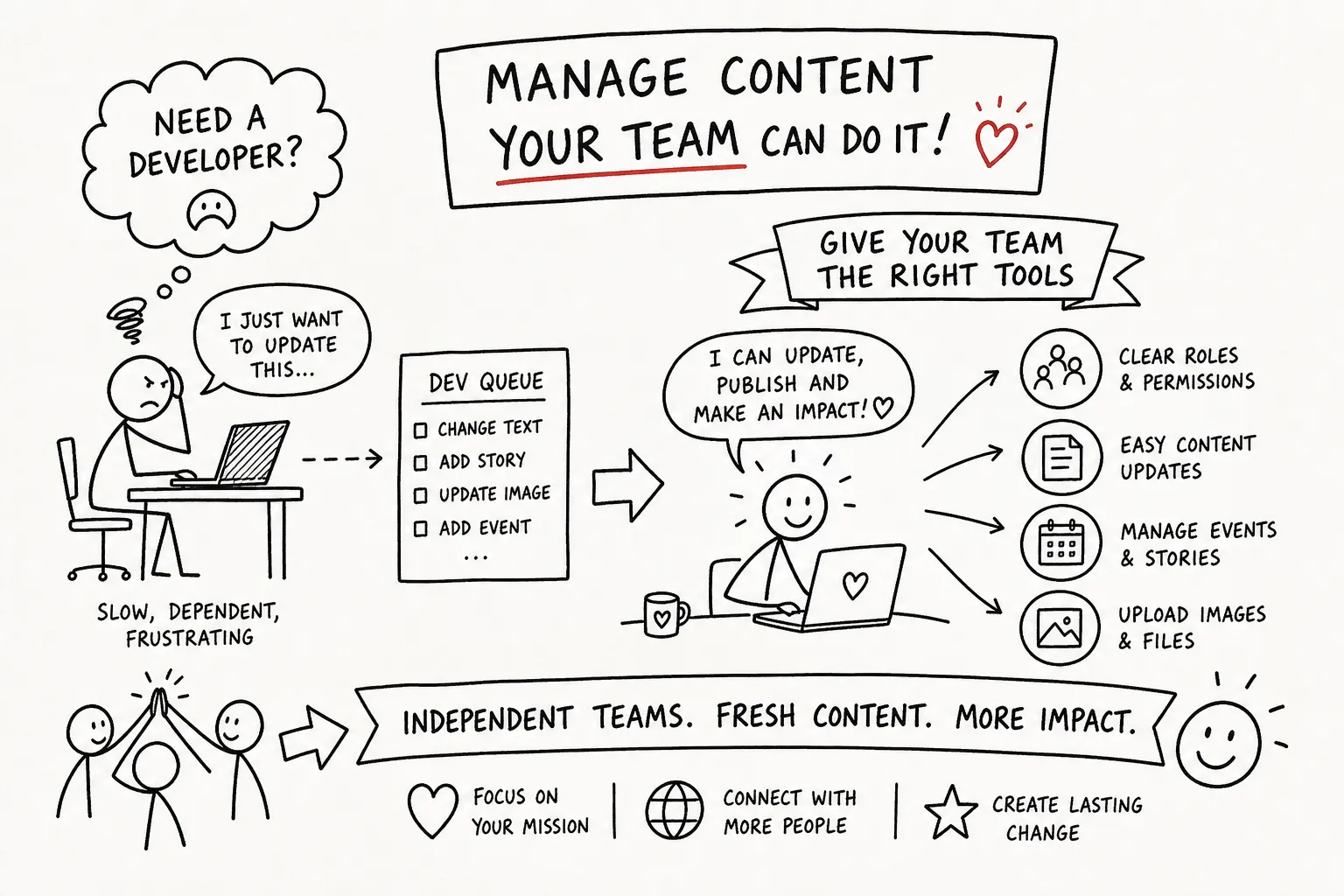
Charity website content management does not have to mean queuing for developer time. With the right configuration in place, your team should be able to publish, update, and launch independently. If you are not sure what that configuration looks like for your organisation, start with a diagnostic that maps your current setup against what your communications team actually needs, that conversation will shape every design and platform decision that follows.
How to manage charity website content without a developer
Charity website content management often becomes a bottleneck long before anyone realises the platform is not the problem. A campaign is ready. The copy is approved. The donation page needs updating. And nobody can touch the website without calling in a developer. The campaign goes out late, the moment passes, and the CMS that was supposed to make publishing easier becomes the thing standing between the organisation and its audience. This is not a platform problem. It is a configuration problem, and it is far more common than it should be.
Most charities invest real energy in choosing a CMS. Considerably less goes into configuring it so the communications team can actually use it, an observed pattern across the sector that any agency working with nonprofits will recognise quickly. This article addresses both: which type of system suits your charity's size, budget, and governance needs, and how to set it up so your team can publish donor pages, launch campaigns, and update programmes without queuing for external help. This kind of structural configuration is what specialists like Socialectric build into a Webflow website from the outset, before habits and workarounds get embedded in the team.
Why charity website content management usually becomes a bottleneck
The problem is rarely the platform itself. WordPress, Webflow, Drupal: all of them are capable of giving a communications team genuine independence. The issue is how the site gets built and handed over. Many charity websites are built with developer-facing logic baked in: unstructured fields, no editorial templates, admin access given to everyone or nobody. Every minor update then becomes a support ticket. That is not a technology failure; it is a configuration failure, and it compounds over time as the team grows around the dysfunction.
The operational cost is real and measurable. A fundraising appeal that cannot go live until next week because someone is waiting on a developer. A programme update sitting in a Slack thread because nobody has publishing access. A donation page that needs revised copy before a grant deadline but requires technical intervention to change. These are not minor inconveniences, they affect donor trust, campaign timing, and the morale of communications staff who are good at their jobs but blocked from doing them. Framed correctly, this is a governance issue: an organisation that cannot communicate responsively has an infrastructure problem at its core.
Choosing the right CMS type for your charity
There are three main categories of charity CMS, each carrying different cost, complexity, and independence implications. Hosted SaaS platforms, including Webflow, Squarespace, and purpose-built nonprofit platforms, typically cost between £1,000 and £10,000 to build and between £30 and £500 per month to run, based on current market rates. Internal maintenance burden is low. Open-source platforms with agency support, such as WordPress for nonprofits and Drupal for charities, usually cost £5,000 to £30,000 to build and £2,000 to £15,000 per year to maintain once you account for hosting, updates, security patches, and plugin management, and it's worth reviewing available guidance on open-source CMS for charity websites when planning budgets. Bespoke CMS builds start at around £25,000 and can reach £150,000 or more; ongoing costs are substantial, and this option is rarely appropriate for charities below a certain operational scale. If you are weighing hosted against self-hosted options, a Webflow vs WordPress comparison can help clarify trade-offs between a managed SaaS and a self-hosted approach.
WordPress is the dominant platform in the UK charity sector, accounting for the majority of nonprofit websites according to web technology surveys. Dominance does not equal suitability. A well-configured hosted platform will consistently outperform a poorly configured open-source one, regardless of how many features WordPress or Drupal theoretically support, see a useful Drupal vs WordPress comparison for a high-level look at strengths and weaknesses. The right question is which option gives your communications team the most operational independence at the lowest long-term cost, and the answer depends far more on configuration than on the platform name.
Integration requirements shape this decision more than most organisations expect. Some platforms, including NationBuilder and Drupal paired with CiviCRM, offer native fundraising and donor management as part of the same system. General-purpose platforms like WordPress and Webflow connect to third-party tools such as Donorbox, GiveWP, or Stripe. Neither approach is inherently wrong, but each additional integration increases the potential maintenance surface and failure points. The integration method matters as much as the integration capability. The cleaner the connection, the less ongoing maintenance the team has to manage or commission, for examples of platforms chosen with fundraising in mind, see this overview of CMS platforms for fundraising.
Setting up charity website content management roles so your team can publish without asking for help
There are two failure modes in CMS role configuration, and both are common in the charity sector. The first is too permissive: every staff member has admin access, creating security risks, consistency problems, and the constant possibility that someone accidentally breaks something significant. The second is too restrictive: editors cannot update a news post without triggering a developer request, so the site stagnates and the team loses confidence in the system. Neither serves a communications team that needs to move quickly.
A sensible role hierarchy for a typical charity communications team looks something like this:
- The content editor can create and update pages using approved templates, publish campaign updates and news, and manage media assets without touching navigation or global styles.
- The fundraising manager can update donor pages, revise campaign goals, and refresh appeal copy without access to structural site elements.
- The administrator, usually one or two senior staff or a contracted specialist, holds full access and is responsible for structural changes and user management.
This is not a complicated structure. The difficulty is that it needs to be built into the CMS during the initial configuration phase, before the team starts publishing, not improvised afterwards when workarounds have already set in.
Content templates that make publishing fast and consistent
A blank CMS page looks like flexibility. In practice, it is a problem. When editors face an empty canvas, they either freeze or create inconsistent content that undermines the site's credibility over time. Templates remove that friction without limiting what editors can do. A well-built campaign template pre-populates the correct heading hierarchy, includes defined fields for the key message, the call to action, and the donation link, and guides the editor through the process without requiring design knowledge. The page looks right because the structure makes it hard for it to look wrong.
Charity communications teams commonly publish from a relatively small set of repeating page types: campaign and appeal pages, programme and project updates, donor acknowledgement and impact reports, news and press releases, and event listings. Each of these should have a pre-configured template in the CMS. This is not about limiting editorial creativity; it is about making the right choice the easy choice for whoever is publishing on a Tuesday afternoon before a board meeting. When the template exists, the editor focuses on the message. When it does not, they spend their time making layout decisions they are not qualified to make and producing results the organisation did not intend.
Fundraising integrations and campaign automation
Modern donation form integrations, when set up correctly, are genuinely straightforward for non-technical staff to manage. An embedded Donorbox or Stripe form, connected via a native CMS integration, updates in real time without requiring code changes. The fundraising manager updates the campaign goal, refreshes the copy, adjusts the call to action, and publishes. The underlying integration does not need to be touched. The key phrase there is "when set up correctly": this requires a specialist to configure the connection properly at the build stage, not something to be improvised after launch.
Automation at the CMS level extends what a small communications team can deliver without additional resource. When a donor completes a form, an acknowledgement email sends automatically. When a campaign page goes live, it can trigger a social post via a connector such as Zapier. When a programme update is published, it populates a newsletter block for the next send. Routine content and campaign tasks typically require no ongoing developer involvement once workflows are correctly configured, though occasional specialist support may still be needed for upgrades, structural changes, or more complex integrations. The distinction matters: the goal is one-time setup work that delivers long-term operational independence, not a dependency that simply shifts from one external party to another.
What professional charity website content management actually delivers
Most charity website builds end with a handover session, a recorded walkthrough, and a wave goodbye. That is not CMS configuration. It is the absence of it. A genuine configuration process means the system has been built around how the communications team actually works: the templates they need for the content they publish, the roles that match their organisational structure, the integrations that serve their fundraising calendar, and the automation that removes repetitive manual tasks from their workflow. A practical reference for how to structure that system can be found in Socialectric's work on CMS architecture for nonprofit content teams.
For your charity, this means that when Socialectric builds a Webflow website, CMS configuration is part of the core build, not an optional addition. User roles are mapped to your actual team structure before a single page goes live. Content templates are built for the specific page types your team publishes most. Integrations for donation flows, campaign pages, and programme updates are wired and tested before launch. The outcome is a communications team that can operate the site independently from day one: publishing, updating, and launching without external involvement for routine content management. That independence reduces ongoing costs and eliminates the developer dependency that slows most charities down, you can read about how this project approach works in practice in How Socialectric manages nonprofit website projects.
The configuration question comes before the platform question
The choice of CMS matters, but it matters less than how the CMS is configured. A well-set-up open-source platform will serve a charity better than a poorly configured enterprise system. The practical path forward is this: choose a platform that fits your budget and integration needs, configure user roles that reflect your actual team structure, build templates for the content you publish most often, and connect your fundraising tools properly from the outset. Thinking about governance as a core part of the build is essential, see Socialectric's guide to nonprofit website design governance frameworks for a deeper dive.
Charity website content management does not have to mean queuing for developer time. With the right configuration in place, your team should be able to publish, update, and launch independently. If you are not sure what that configuration looks like for your organisation, start with a diagnostic that maps your current setup against what your communications team actually needs, that conversation will shape every design and platform decision that follows.
Question 1: Why does charity website content management so often become a bottleneck?
A: It’s usually a configuration and governance problem rather than a platform failure. Sites are often built with developer-facing logic—unstructured fields, no editorial templates, or inappropriate admin access—so routine updates require technical support and create delays that damage campaigns and donor trust.
Question 2: How can we stop needing a developer every time we update our charity site?
A: Configure the CMS for editorial autonomy: use structured fields, set up editorial templates and role-based access, and limit developer-only logic. Specialists like Socialectric build these configurations into a Webflow website from the start so communications teams can publish donor pages, launch campaigns, and update programmes without external help.
Question 3: Which type of CMS is best for a small charity: hosted SaaS, WordPress/Drupal, or bespoke?
A: For most small charities a hosted SaaS platform is the most cost-effective and low-maintenance option because internal maintenance burden is low and setup costs are moderate. Open-source platforms like WordPress or Drupal can work but usually need agency support and higher ongoing maintenance, while bespoke builds are expensive and rarely appropriate below a certain operational scale.
Question 4: What are the typical costs for each CMS type?
A: Hosted SaaS platforms (including Webflow and Squarespace) typically cost £1,000–£10,000 to build and £30–£500 per month to run. Open-source builds (WordPress/Drupal with agency support) usually cost £5,000–£30,000 to build and about £2,000–£15,000 per year to maintain, while bespoke builds start around £25,000 and can exceed £150,000 with substantial ongoing costs.
Question 5: How should we configure our CMS so the communications team can publish independently?
A: Design a content model with structured fields and reusable editorial templates, implement role-based admin access, and remove developer-only custom logic where possible. Train the team on the CMS workflows and document publishing processes so updates like donation page copy or campaign pages can go live without technical tickets.
Question 6: Is WordPress the best choice for charities in the UK?
A: WordPress is dominant in the UK charity sector but dominance doesn’t equal suitability—what matters is how the site is configured. A well-configured hosted platform can outperform a poorly configured open-source site, so compare trade-offs (for example via a Webflow vs WordPress comparison) and prioritise configuration and governance.
Question 7: What governance problems cause slow communications and how do they affect fundraising?
A: When publishing rights and site structure are poorly governed, routine updates queue for developers and campaigns miss time-sensitive moments. Those delays harm donor trust, impede campaign timing, and demoralise communications staff, so fixing governance and infrastructure is essential to responsive fundraising and programme updates.
Is this familiar?
Most nonprofit websites don't fail at launch. They fail quietly, over time.
The governance gaps, the stakeholder confusion, the Board that's stopped referring people to the site — these don't announce themselves. See what the difference looks like when it's built correctly from the start.
Eric Phung has 7 years of Webflow development experience, having built 100+ websites across industries including SaaS, e-commerce, professional services, and nonprofits. He specialises in nonprofit website migrations using the Lumos accessibility framework (v2.2.0+) with a focus on editorial independence and WCAG AA compliance. Current clients include WHO Foundation, Do Good Daniels Family Foundation, and Territorio de Zaguates. Based in Manchester, UK, Eric focuses exclusively on helping established nonprofits migrate from WordPress and Wix to maintainable Webflow infrastructure.
Ready to understand your current situation clearly?
The Blueprint Audit is where we start.
A two-to-three week diagnostic that maps your stakeholder needs, audits your current site, and gives you a clear strategic brief before any implementation commitment is made. £2,500. No obligations beyond the audit itself.
In case you missed it
Explore more
Join our newsletter
Subscribe to my newsletter to receive latest news & updates
